iCoverArt: Introduction to our iTunes Utility
New Version 2.3!
iCoverArt (download) is an iTunes utility that automates embedding album cover art into song files — and more! iCoverArt can:
- Embed artwork into song files
- Delete embedded artwork
- Help you to download artwork via iTunes
- Create album artwork thumbnails for display in Windows Explorer
Using iCoverArt to embed artwork in your iTunes software song files is fast, easy and ensures that...
- Artwork is displayed on your iPod or iPhone while a song is playing (if your iPod supports it).
- Artwork is displayed within iTunes while a song is playing (open the Edit menu and choose Show Artwork).
- Artwork is displayed in iTunes visualizations.
- You can print CD jewel case covers or album listings with the album artwork (open the File menu in iTunes and choose Print).
iTunes can automatically download album artwork — it's a great feature! iTunes will store the artwork separately from each song file. This is good because an entire album can share one cover art image, thus saving space. But sometimes you want to embed the artwork so that it remains with the song file if you move or copy it somewhere, or to be able to use it with a non-Apple player.
iCoverArt requires only iTunes (version 7.7.1 or later) installed on a Windows-based system. iCoverArt does not require an iPod. Of course, iCoverArt will also work great if you are using iTunes along with any type of iPod or iPhone
-- iPod, iPod touch, iPod nano, iPod mini, iPod photo, or iPod shuffle. (Of course, not all iPod models can display album artwork.)
iCoverArt is most useful if you have ripped your CD collection into iTunes, since you will not yet have cover art in those song files. (Songs purchased online from the iTunes Music Store already have cover art embedded in each song file.) iCoverArt can embed album cover images in JPG, GIF, PNG, or BMP format into song files in MP3, AAC (and .M4P), AIFF, or Apple Lossless format (.M4A). iCoverArt works best when you have enabled the iTunes option "Keep iTunes Music folder organized" or otherwise have your music folders organized by album.
iCoverArt can embed artwork from the following sources:
- Artwork downloaded by iTunes.
- A file named Folder.JPG in the album's folder.
- Artwork downloaded by Windows Media Player.
You can choose and prioritize which artwork image to embed. You can also add artwork by dragging an image from a browser window onto the iCoverArt window.
When you are browsing your song files using Windows Explorer, each album's Folder.jpg image will be displayed on the folder icon (in Thumbnail view in Windows XP, or in medium, large, or extra large icon sizes in Windows Vista).
Register iCoverArt for only $5.00
Please be aware that until you have registered your copy of iCoverArt, it will only process five songs each time it is run.
You only need to register your copy of iCoverArt once - all future versions of iCoverArt are free to registered users. (Users of previous versions can use the new version automatically!) Try out iCoverArt to see if you like it. If you find our
iTunes Windows utility useful, please register your copy of iCoverArt to be able to
run it without the five song limitation.
Screenshot
(click on picture to see a larger image)
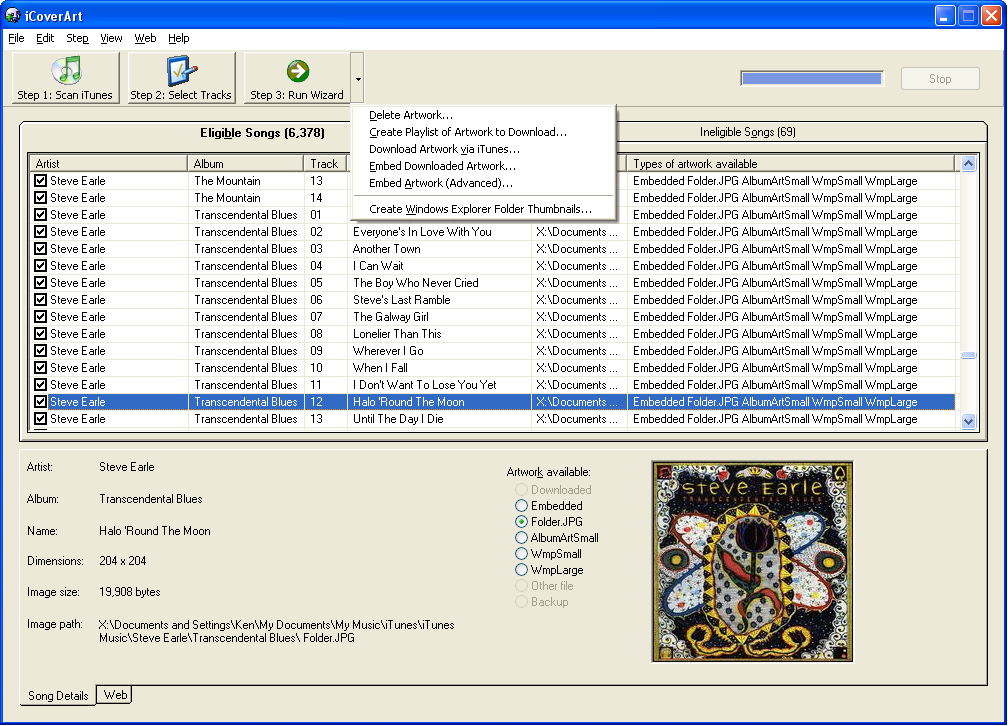
This screenshot shows typical use of iCoverArt. The list of songs is shown, as well as what types of art are available to be embedded for each song. The next step is usually to choose an embedding wizard to execute from the list of wizards on the Step 3 button. See the documentation for more details.
Related software: Scripts for iTunes
Be sure and check out our iTunes freeware - Scripts for iTunes. Scripts for iTunes is a free collection of scripts that can be used to control iTunes. You can use them from the command line, in a batch (command) file, or you can assign them to the special controls keys on a multimedia keyboard (such as "Play", "Next", or "Previous").
Scripts for iTunes supports for iTunes for Windows and does not require an iPod.
Get our Scripts for iTunes freeware now!
Related software: TiViTunes
Also check out our TiViTunes utility. TiViTunes will publish your iTunes playlists to TiVo!
Try our TiViTunes shareware now!
iTunes®, iPod®, and iPhone® are registered trademarks of Apple Computer, Inc. iCoverArtTM is a trademark of Maximized Software.



;)